
For a small or midsize business, choosing security monitoring is not just a matter of asking whether a provider uses advanced tools. The useful questions are more practical. Which systems are watched? Who reviews suspicious activity? What happens after an alert, and how does that work connect with the IT team already supporting the business?
Talk with IGTech365 about this article
Send a note and we will reply from this page.
When comparing managed detection and response providers, look for continuous visibility across endpoints, networks, cloud services, and data. You also want human investigation, clear escalation, containment, incident response, and reporting. Microsoft describes the process as prioritizing alerts, hunting for threats, then handling containment, response, and root-cause work.
That distinction matters because a detection tool can surface a warning without the context your team needs. It also helps separate security operations from routine maintenance while keeping both functions coordinated. Start by defining what the provider can actually see and investigate, including the devices, users, cloud accounts, and network activity that matter most.
Talk with IGTech365 about managed security monitoring.
What managed detection and response providers actually monitor.
A buyer should ask managed detection and response providers exactly which environments they can see. Do not stop at a promise of round-the-clock monitoring. A useful scope usually includes endpoint devices, user identity, cloud services, email, and the network connecting them. If a provider cannot collect telemetry from a critical system, its team may not see the activity needed to connect an alert to a broader attack.
Cisco describes several levels of coverage. Managed endpoint detection and response (MEDR) concentrates on endpoints, while managed network detection and response (MNDR) focuses on network activity. Managed extended detection and response (MXDR) can bring together endpoints, networks, cloud environments, and IoT. The labels matter less than the data sources and the investigation process behind them. Ask which devices, Microsoft 365 services, cloud accounts, mail systems, firewalls, and network traffic are included, and which require a separate tool or service.
Visibility is only the first part of the service. Microsoft describes MDR as a combination of technology and human expertise, with around-the-clock monitoring, human-led threat hunting, and response. The provider should explain how it prioritizes alerts, investigates suspicious activity, contains an incident, and reports what happened. A dashboard full of detections is not the same as a team that can interpret them and help drive a response.
It is also worth separating a broad cybersecurity program from a full MDR engagement. IGTech365 provides Tampa businesses with 24/7 threat monitoring, firewall management, Microsoft 365 protection, vulnerability testing, employee security guidance, and backup and recovery planning. Those services can reduce risk, but a buyer should still confirm the requested scope. Ask whether identity, email, cloud, endpoint, and network telemetry are included, along with human investigation and response. Healthcare, legal, and manufacturing businesses often have extra systems and compliance needs to map into that review.
Before hiring, ask for a written coverage list. Clarify what happens when telemetry is missing, an integration fails, or an alert needs customer action. If you are still determining when an MDR service is needed, start with the systems that carry your most sensitive data. For organizations evaluating managed network detection, confirm how network visibility fits with endpoint, identity, cloud, and email monitoring. Do not treat network visibility as the entire program.
How an alert gets investigated and handed off.
A useful MDR conversation should explain what happens after a signal appears, not just promise 24/7 monitoring. For a Florida small business, that process matters because the internal IT person may also be the help desk. The provider should reduce the noise, investigate the concern, and make ownership clear. Your IT person should not be left to interpret a dashboard alone.
Microsoft describes MDR as a service that combines technology with human expertise for monitoring, threat hunting, and response. Its process includes prioritizing alerts, separating false positives, investigating threats, containing incidents, responding, and examining root causes. Cisco also points to enrichment, which adds context from security data and threat intelligence so investigators can decide faster. Sources: Microsoft’s MDR overview and Cisco’s MDR overview.
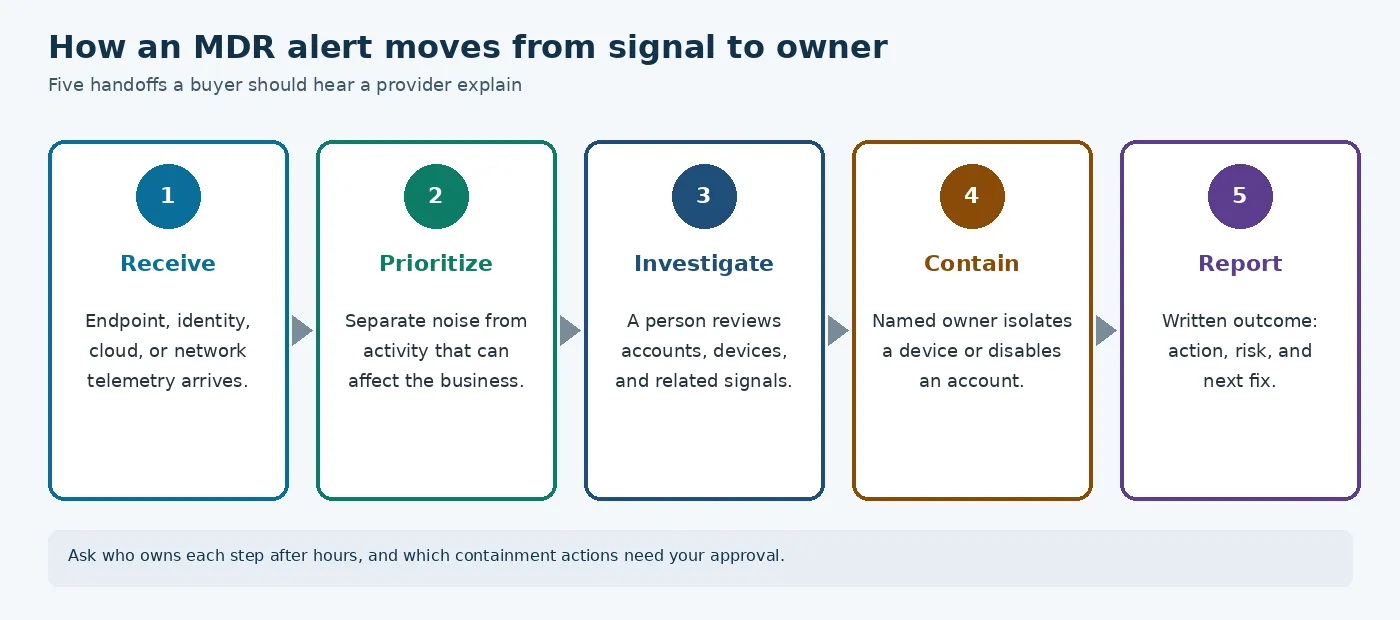
On a sales call, ask a prospective provider to walk through these five steps in plain language:
- Receive and enrich the alert. Ask what security data is reviewed, such as endpoint, network, or cloud activity. Ask how the provider adds context before deciding that an alert deserves attention.
- Prioritize the real risk. A serious provider should explain how it separates false positives from events that could affect your business. Ask what information changes an alert’s priority, and how your IT contact avoids chasing every notification.
- Investigate with a person involved. Automated detection can surface unusual activity, but a person should test what happened. That review should name the systems or accounts involved and whether the activity connects to anything else. Ask who investigates and what evidence they review.
- Contain the incident and name the next owner. The handoff should identify who can isolate a device, disable an account, or take another approved action. That person may be the provider, your internal IT contact, or both. Co-managed IT can extend an existing team while the client remains in charge. Learn more about co-managed IT support.
- Document the outcome and the cause. Ask what written report you receive after an investigation. It should cover the finding, the actions taken, the remaining risk, and the recommended next steps. Weekly or monthly reporting, plus root-cause analysis, can turn one alert into a fix instead of a repeat surprise.
This is the level of operational detail a buyer should expect. Tools and escalation models will vary. The provider should still describe the path from signal to decision, response, named owner, and written outcome.
How a provider differs from a basic managed IT package.
Managed IT and managed detection and response can work together, but they answer different operational questions. A managed IT services package is built around keeping users, devices, Microsoft 365, backups, and everyday systems working. A detection and response provider focuses on security telemetry. It identifies suspicious activity, investigates whether it is a real threat, and takes agreed containment steps when needed.
That distinction matters at 2 a.m. A help desk may restore access or troubleshoot a failed application. A security provider may need to investigate an unusual sign-in, isolate a device, or escalate a confirmed incident. Those responsibilities can overlap. They should not be assumed to be identical just because both services mention monitoring.
| Managed IT support. | Detection and response provider. | What to confirm. |
|---|---|---|
| A technology support team watches system health, availability, maintenance needs, and user issues. | A security-focused team investigates telemetry for suspicious behavior and potential threats. | Ask whether security monitoring is included, separate, or handled by another team. |
| It typically watches endpoints, networks, Microsoft 365, backups, and other managed systems. | It may analyze endpoint, network, cloud, and identity signals, depending on the service scope. | Confirm which data sources are connected and which environments are excluded. |
| At 2 a.m., it may address an outage, failed backup, access issue, or other service problem. | At 2 a.m., it may validate an alert, investigate activity, and contain a threat when authorized. | Ask which containment and response actions are included, and which require approval. |
| It communicates with users about support requests, planned maintenance, and technology changes. | It communicates security findings and response needs to the designated business or IT contact. | Confirm who receives alerts, who can authorize action, and how urgent events are escalated. |
| Monthly reporting may summarize tickets, system health, maintenance, and service activity. | Monthly reporting may summarize investigated alerts, threats, response activity, and trends. | Request a sample report and verify that it shows decisions and outcomes, not only alert counts. |
IGTech365’s cybersecurity approach includes 24/7 threat monitoring, vulnerability testing, firewall management, and a Security Readiness Assessment. Those capabilities can complement flat-rate managed IT, which includes 24/7 system monitoring, live user support, Microsoft 365 administration, and backup support for Tampa businesses. Even so, a buyer should ask what happens after detection. Monitoring does not by itself explain whether someone investigates the alert, isolates a device, coordinates incident response, or simply forwards it.
Call IGTech365 at (866) 365-7798.
The arrangement can also be co-managed. With co-managed IT, the client’s team stays in charge while an outside partner adds coverage or specialist support. If you are comparing EDR and MDR for a small business, keep the same practical question in view. Who is responsible for acting when the signal becomes a security incident?
Questions to ask before you sign.
A provider’s presentation can sound comprehensive while leaving important boundaries unclear. Before signing, ask what the service actually sees, who can act on an alert, and how that work fits into your existing IT responsibilities.
- Which log sources are included in the base fee? Ask whether monitoring covers endpoints, firewalls, servers, cloud systems, and network devices. Also ask whether important sources require separate onboarding or charges.
- Are identity systems and Microsoft 365 included? Confirm that sign-ins, privileged accounts, email, and other cloud activity are part of the monitoring scope. Endpoint-only coverage can leave meaningful gaps.
- Who is authorized to isolate a device? The agreement should say whether the provider can contain a suspected threat directly, or whether your team must approve the action. Emergency authority should be documented.
- How does after-hours escalation reach a person? Ask who receives urgent alerts outside business hours, how the path is tested, and what happens if the first contact does not respond. Do not accept a round-the-clock monitoring slogan as a substitute for a clear human handoff.
- What will the weekly or monthly report contain? Look for investigated alerts, notable threats, actions taken, unresolved risks, coverage changes, and recommended next steps. A report should help you make decisions, not simply confirm that a dashboard exists.
- How will the provider coordinate with our managed IT or co-managed team? Define ownership for patching, account changes, firewall work, device recovery, incident communications, and follow-up. In a co-managed model, your IT team stays in charge while the security partner adds coverage, so the handoffs should be explicit.
IGTech365 starts with a cybersecurity services assessment rather than a tool list. That assessment considers people, devices, networks, cloud services, data, and processes, then helps prioritize gaps. This starting point makes it easier to define what monitoring belongs in the base scope and what your team still owns. If an event occurs, clarify how incident response services connect to the monitoring relationship. For a terminology refresher before comparing proposals, see the differences between SOC, SIEM, MDR, and XDR.
Frequently Asked Questions.
What should managed detection and response providers monitor for a small business?
Ask whether the service covers the systems your business actually uses, including endpoints, cloud services, networks, Microsoft 365, and security devices. Confirm how data is collected and whether the team can see activity across those environments. Also ask whether monitoring includes threat hunting rather than only reviewing automated alerts. Coverage should match your risk, workforce, and compliance obligations.
Who investigates an alert when a provider finds suspicious activity?
A security analyst should review the alert, filter false positives, add context, and decide whether it is a credible threat. The provider should explain who contacts your business, what information they share, and how your managed IT partner is included. Microsoft describes this work as prioritization, threat hunting, containment, response, and root-cause analysis. Microsoft’s MDR overview outlines that process.
How is MDR different from managed IT?
Managed IT keeps users, devices, applications, networks, and backups operating reliably. MDR focuses on finding and investigating security threats, then coordinating containment and response. The two services can work together. Your managed IT partner understands the environment and can make operational changes, while the MDR team contributes dedicated security monitoring and investigation. Confirm who owns each handoff before an incident occurs.
What should we confirm before signing an MDR contract?
Confirm the monitored assets, hours of coverage, alert rules, escalation contacts, response authority, containment actions, reporting schedule, and any exclusions. Ask what happens during an active incident and whether the provider coordinates with your managed IT partner. Also clarify onboarding, data return when you leave, support for compliance needs, and which response work costs extra.
Ready to Talk Through Your Coverage?
If you are weighing whether managed detection and response belongs alongside your managed IT support, start with a practical conversation. IGTech365 can discuss how security monitoring may complement the support you already rely on, and where the responsibilities should sit. We are a Tampa managed services provider, founded in 2015, focused on healthcare, legal, and manufacturing organizations that cannot afford downtime.
Call IGTech365 at (866) 365-7798 or send a note through the contact page to schedule a conversation about security monitoring and managed IT coverage.