

Microsoft has made its Automated Incident Response in Office 365 Advanced Threat Protection (ATP) generally available to enterprise customers.
Is your business protected against the latest phishing threats? IGTech365 helps Tampa businesses secure Microsoft 365. Call (866) 365-7798.
The automation feature, announced in preview earlier this April, aims to help security analysts respond faster and more systematically to a barrage of security alerts.
Microsoft is making two categories of automated incident response generally available. The first are automatic investigations that commence in response to new alerts, such as users reporting phishing email, users clicking on a link determined to be malicious, malware being detected in received email, and phishing email that has landed in a user’s mailbox.
The second category consists of manually initiated investigations that use Microsoft’s ‘automated playbook’ sequences for different scenarios and attack types.
For example, one playbook helps security analysts respond to user reports of phishing email, while the ‘weaponized URL playbook’ assists in the response to a URL found to be malicious. Security analysts can launch these investigations through Microsoft’s Threat Explorer tool.
The playbooks “correlate similar emails sent or received within the organization and any suspicious activities for relevant users”. The playbooks also flag suspicious activities on user accounts, such as mail forwarding, mail delegation, Office 365 Data Loss Prevention (DLP) violations, or suspicious email sending patterns.
Overall, the playbooks aim to help analysts quickly contain a threat, for example, by locking down accounts and devices as well as requiring multi-factor authentication, and ultimately removing the threat.
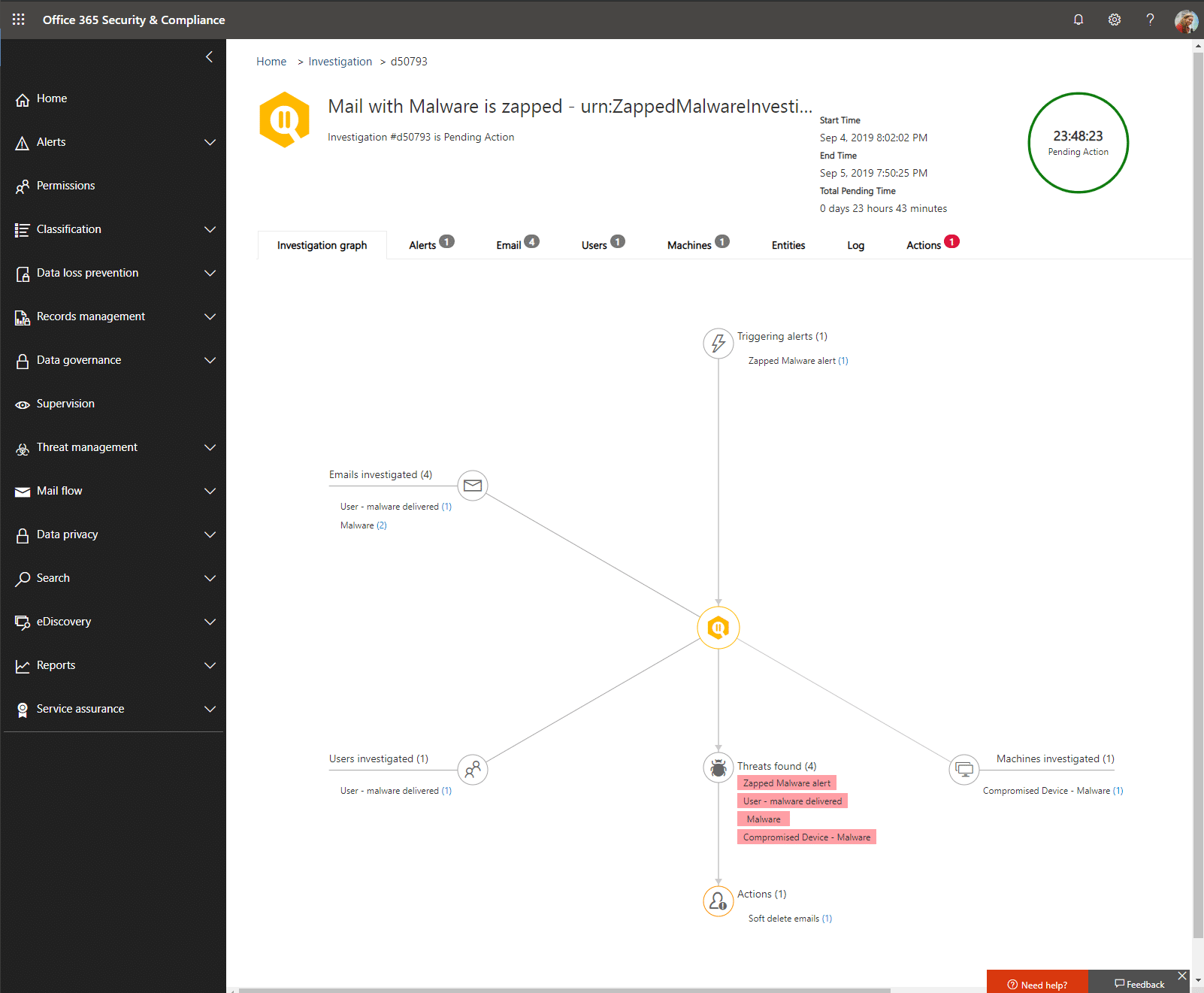
The investigation dashboard provides details about the investigation number, the time it started and ended, pending actions required, as well as users, devices and emails investigated.
The automated incident response features are available to organizations with the Office 365 ATP Plan 2, which costs $5 per user a month, as well as Office 365 Enterprise E5 tier, which costs $35 per user a month.
Both require contracts of one year. It is also available in the Microsoft 365 E5 Security bundle.
Source by: Zdnet.com
Request a Free IT Analysis Today
Microsoft 365 Security in 2026
Since Microsoft launched automated incident response in 2019, the phishing and malware landscape has evolved dramatically. According to the 2025 Verizon Data Breach Investigations Report, phishing remains the leading attack vector, accounting for 36% of all data breaches. Microsoft Defender for Office 365 has evolved significantly in response, now incorporating AI-powered threat detection that analyzes email patterns, sender reputation, and attachment behavior in real time.
Current Microsoft 365 security features include advanced anti-phishing protection with spoof intelligence, AI-driven malware detection using machine learning models trained on billions of emails, automated investigation and response (AIR) that can contain threats within seconds, and integration with Microsoft Sentinel for comprehensive security information and event management. Microsoft’s 2025 Digital Defense Report noted that Defender for Office 365 blocks over 15 billion phishing emails and 6 billion malware messages annually across its customer base.
For Tampa businesses, the key takeaway is that while Microsoft 365 provides robust built-in security, a layered approach remains essential. The 2025 Ponemon Institute Cost of a Data Breach report found that organizations using only native cloud security tools experienced breaches costing an average of $4.45 million, compared to $3.15 million for those supplementing with dedicated security solutions. IGTech365’s cybersecurity services complement Microsoft 365 protections with 24/7 threat monitoring, security awareness training, and incident response planning. Explore Microsoft 365 managed services for your Tampa business or contact our IT services team to learn more.
Want to strengthen your Microsoft 365 security posture? IGTech365 can help. Call (866) 365-7798.
Frequently Asked Questions
How effective is Microsoft 365 at blocking phishing emails in 2026?
Microsoft 365’s built-in phishing protection is highly effective but not foolproof. Microsoft Defender for Office 365 blocks over 15 billion phishing emails annually, using AI-powered analysis of sender behavior, email content, and link reputation. However, the 2025 Verizon DBIR found that 36% of all breaches still involve phishing, indicating that no single solution catches everything. Advanced threats like business email compromise (BEC) and spear phishing often bypass automated filters by mimicking legitimate communications. That’s why IGTech365 recommends combining Microsoft 365 protections with employee security awareness training, AI-enhanced email filtering, and 24/7 SOC monitoring for the strongest defense.
Do I need additional security beyond Microsoft 365?
Yes, in most cases. While Microsoft 365 provides strong baseline security, a defense-in-depth strategy requires additional layers. Key gaps include: no built-in DNS filtering to block malicious websites, limited visibility into encrypted traffic, no on-premises or hybrid network protection, and no multi-layered endpoint detection and response (EDR). Many Tampa businesses supplement Microsoft 365 with dedicated endpoint security, security awareness training, 24/7 SOC monitoring, and advanced email filtering. According to IBM’s 2025 Cost of a Data Breach report, organizations with a layered security approach containing both native and third-party tools saved an average of $1.3 million per breach compared to those relying solely on native protections.
What is automated incident response in Microsoft Defender?
Automated Incident Response (AIR) in Microsoft Defender for Office 365 is a feature that automatically investigates and remediates security threats without human intervention. When a user reports a phishing email, a malicious link is clicked, or malware is detected, AIR immediately begins an investigation. It correlates the alert with similar emails sent or received across the organization, identifies suspicious user activities (like mail forwarding or DLP violations), and automatically contains threats by locking down accounts and devices. AIR reduces the average threat containment time from hours to minutes, according to Microsoft. IGTech365 helps Tampa businesses configure and optimize these automated playbooks to match their specific security requirements.
Contact IGTech365 today at (866) 365-7798 to learn how we can strengthen your Microsoft 365 security and protect your Tampa business from evolving phishing and malware threats.